research-slides: a Claude Code skill for preparing research talks
My personal skill turns a literature review or a set of results into Beamer slides, a bilingual speaker guide, and an interactive page for practicing the talk. A full example is embedded below.
I often present literature reviews and experiment results to my advisor. Making the slides is only half the work. The other half is understanding every page well enough to explain it, and answering questions in English, which is not my first language.
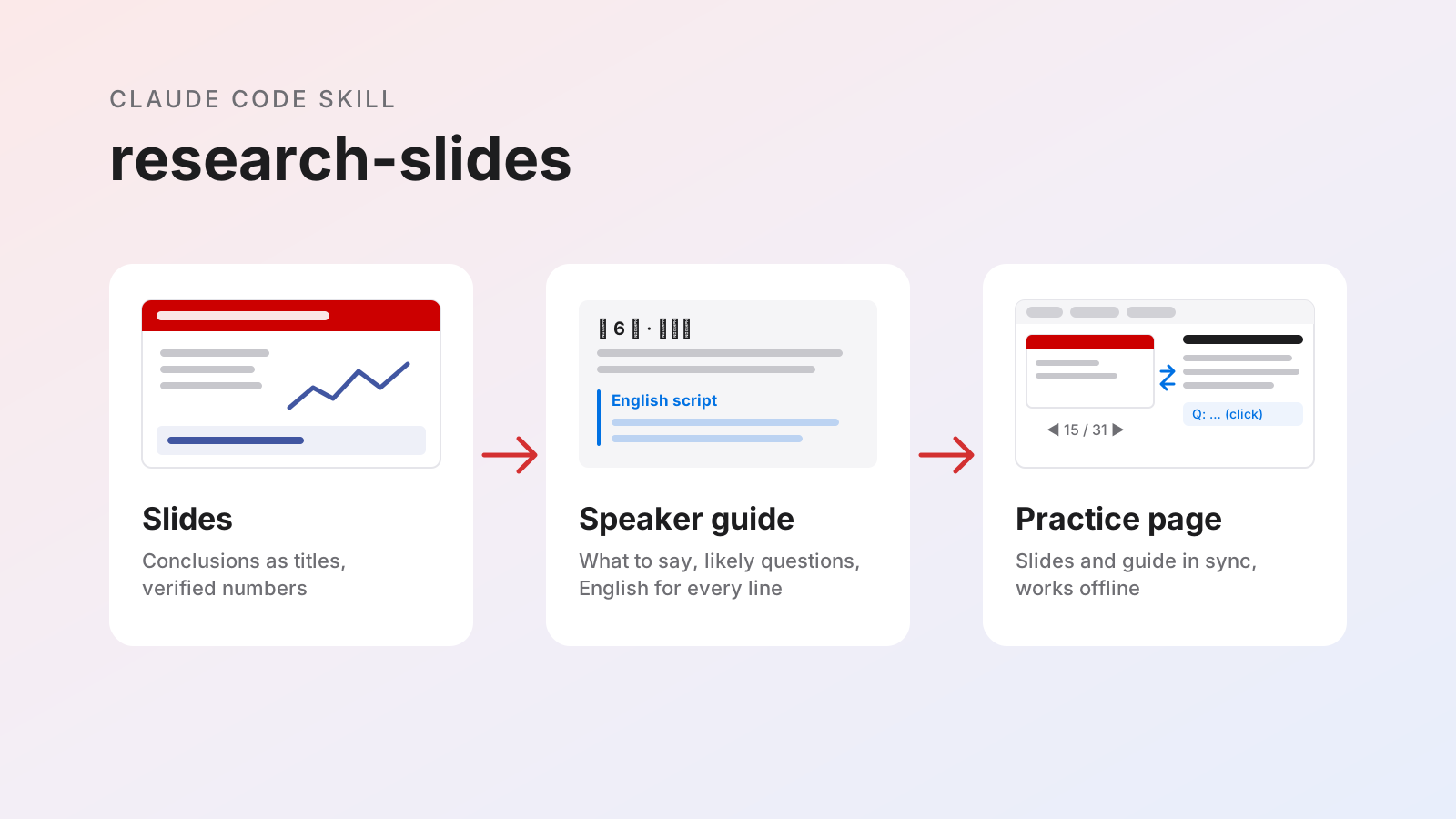
So I wrote a Claude Code skill called research-slides. For each talk, it produces three things:
- Slides: a LaTeX Beamer deck, compiled to PDF.
- A speaker guide: what each page means, what to say, and which questions to expect, with English for everything I need to say out loud.
- An interactive page: the speaker guide as a single HTML file, with the slides pinned beside it, for studying and rehearsing.
Below is a real example: the guide for a 30-minute literature review, embedded so you can use it directly.
Try it
A few things to try:
- Flip slides with ◀ ▶ or the arrow keys. The guide scrolls to the matching page, and scrolling the guide changes the slide.
- Below the current slide are a preview of the next one and a note box for the current page. ✎ 笔记 (notes) in the toolbar collects every note, ready to copy or download.
- Use the three language buttons in the toolbar: Chinese with English on hover, both side by side, or English first.
- Turn on 练习模式 (practice mode). Answers stay hidden until you click a question, so you can test yourself before the talk.
- Hover over a dotted term to see its Chinese name and a short note.
- Start the timer at the top when you begin a rehearsal. It shows which page you should be on by now.
The guide is written in Chinese, with English added for everything spoken. That is how I use it: I study in Chinese and present in English.
What the skill produces
Slides
The deck is a Beamer PDF in 16:9 with NC State colors. Beyond the template, the skill sets rules for content:
- Summary first. The first page lists four or five numbered findings, each starting with a bold conclusion. Reading that page alone tells you the whole talk.
- Titles are conclusions. Every result page has a sentence as its title, such as “MST beats DGSMP by 2.55 dB with 4.4% of its computation,” not a topic such as “MST results.” Each result page ends with a Conclusion box.
- Only verified numbers. Every number must trace back to a results file or a specific place in a paper.
- Existing terms only. A
GLOSSARY.mdin each project records the names and symbols used in my papers, so slides never invent a new name for an existing quantity. - Checks before delivery. A script compiles the deck, reports errors, overflowing text and missing fonts, and renders thumbnails to inspect. Then Claude reads the whole deck as a listener would, looking for overstated claims, inaccurate numbers, pages that contradict each other, unverified words such as “best,” and undefined terms.
Speaker guide
Every deck comes with a Markdown speaker guide, one section per slide. Each section has the same five parts:
- What this page answers, in one sentence.
- An item-by-item explanation of the page: every symbol in a formula, how to read each figure, and what each table column means.
- What to say, followed by an English script sized to the page’s time at about 130 words per minute.
- Questions the audience might ask, each with an EN Q (how someone might phrase it in English) and an EN A (an answer I can say directly).
- A glossary: English, Chinese, and a one-line note.
Before the first slide, a section on presenting live covers time control (which pages to skip if I fall behind), transitions between sections, how to handle questions and challenges, common English phrases, and a map of which backup page answers which question. At the end are a table showing where every number on the slides comes from and a full glossary.
Interactive page
A script in the skill, guide_to_html.py, converts the Markdown guide into one HTML file that works offline. It embeds the slide PDF and draws each page with PDF.js at the screen’s own resolution, so slides stay sharp on a 4K monitor or a projector. The file is about 10 MB and can be copied to an iPad.
The page is also built for presenting, not only for studying:
- Projector window. One button opens a window with only the slides. I drag it to the external display and go full screen, while the laptop shows the guide. A clicker or the arrow keys flip the slide in both windows.
- Safe to look things up. While projecting, scrolling the guide does not change the projected slide, so I can search for an answer during questions. ⤒ 回到本页 (back to this page) returns the guide to the current slide.
Bblacks out the screen during discussion. - Overscan margin. Some projectors crop the edges of the picture. The
-and+keys shrink or enlarge the projected slide, and the margin is remembered. - Next slide and notes. Under the current slide, a preview shows the next one; it cannot be clicked, so it cannot flip the slide by accident. Under it, a note box saves what I want to remember about each page, and all notes can be copied or downloaded as Markdown after the talk.
The Markdown stays the source: it is easier to edit, changes are easy to compare line by line, and every feature lives in the script, so each new guide gets all of them automatically.
How the skill grew
I did not design these rules up front. They grew out of one long Claude Code session on my compressive unlimited sampling project.
It started without the skill. I asked Claude Code to survey applications for CUS, then to summarize recent papers on MRI and hyperspectral imaging in a deck. Partway through, I asked whether it had used research-slides. It had not: the skill lived on my lab server, not on my Mac. Claude Code copied it over and rebuilt the deck. Afterward, I moved my skills into a private GitHub repository that every machine syncs from.
Each correction became a rule. Whenever I corrected something, I asked Claude Code to write that correction into the skill so I would not have to repeat it. Within two days, the skill gained these rules:
- Name decks by content, such as
cus_literature_review.tex, nevermain.tex. - Read the whole deck before delivery. The first read-through of a 19-page deck found 15 problems. For example, “tools can absorb modulo data” became “could accommodate,” because no paper had actually processed modulo data. The comparison “previous best” was replaced by the specific baseline the paper beat.
- Deliver a speaker guide with every deck, and prepare it for live situations.
- Give English versions of everything spoken.
- Copy each deliverable to my Downloads folder.
- Generate the HTML guide, then pin the slides beside it and sync the two.
Some steps ran in parallel. To read the seven papers in detail, Claude Code gave each paper to a separate subagent, which summarized the method and cropped its key figures. To add English to the guide, it split the Markdown into five parts and handled them in parallel. It then checked that not a single Chinese line had changed. Those parallel checks also flagged a few numbers to verify, such as a value written as 17 dB where the paper’s table says 16.66.
Rehearsing shaped the page. Most features of the interactive page came from a few hours of trying it out. First I wanted the slides pinned beside the guide and synced both ways. Then I asked whether one screen could show the slides and another the guide, which became the projector window. On my first projection test, the slides looked soft and the top of each title was cut off. Claude Code switched to drawing the PDF directly at the display’s resolution and added the overscan margin. The next-slide preview and per-page notes came last. Each change went straight into the skill’s script, so my next deck gets all of it.
Questions became research. While studying the guide, I asked whether today’s MRI receivers have enough bits at all. Claude Code looked into it and added a short topic to the guide. A 2009 measurement on clinical 3 T scanners found signals within 88 dB, about 15 bits, which the scanner’s ADC covers. A 2005 study on whole-body mouse imaging at 7 T reported needing about 20 bits. The guide now gives every dynamic range in bits with dB in parentheses, and explains the conversion: one bit is about 6 dB.
Looking back
Most of the rules in this skill record something I once had to say twice. For example, earlier decks always ended with a “Points for discussion” page, and I always deleted it, so the skill no longer adds one. Because the skill keeps that feedback, the next deck starts from where this one ended, on any of my machines.
Making slides now means less formatting work and more time understanding the material. The guide is what I actually rehearse with.

Longwei Yang
Ph.D. student · NC State ECE
Comments
Nickname and comment are required. Email and website are optional. Leave an email to receive reply notifications; it is never displayed publicly. Comments are reviewed before publication and shared between both languages.